
CatchTable is the app behind the tablet you will find at the door of many busy Korean restaurants — and if you have not met it before, it can feel like the restaurant is full when it is not. At a popular place in Korea, you often do not queue on the pavement. You put your number into a screen, walk away, and wait for your phone to tell you when to come back. When my husband and I went for gomtang in Haeundae on Hangul Day, a public holiday in October, the screen said 현재 웨이팅 139팀: 139 groups ahead of us. Nobody was standing outside.
This guide explains how that system works for a visitor: which app to install before you fly, the three different ways Korean restaurants take you in, what to do at the tablet if you do not have a Korean phone number, what happens when your turn comes, and the Korean words that appear on every waitlist screen. The restaurant behind the 139 is in our guide to Geodae Gomtang in Haeundae.
Why Korean Restaurants Use Apps to Queue
Korean has a word for it: 웨이팅 (weiting), borrowed from the English waiting, and it is both a noun and a small cultural event. A restaurant with a long 웨이팅 is a restaurant people want to try, and the length of the queue gets mentioned in reviews the way other countries mention a Michelin star.
For years that meant a line of people outside. Over the past few years most popular places have moved the line onto a tablet. Two companies run most of these systems: CatchTable (캐치테이블) and Tabling (테이블링). The result is better for everyone — nobody stands in the cold or the summer heat, and the street outside stays clear — but it assumes you have a Korean phone, a Korean messaging app and the ability to read the screen. Visitors usually have none of the three.
Which App: CatchTable, CatchTable Global or Tabling
There are two CatchTable apps with almost the same name, and installing the wrong one is the most common mistake.
| App | Who it is for | Sign-up | Useful to a visitor? |
|---|---|---|---|
| CatchTable Global | Overseas visitors | Google, Apple or email — no Korean number needed | Yes. In English, Japanese and Chinese, with foreign cards for deposits |
| CatchTable (캐치테이블) | Residents | Identity check through a Korean mobile carrier | Hard to sign up for without a Korean phone |
| Tabling (테이블링) | Residents | Korean mobile number and identity check | Mostly through the tablet at the door |
So the plan is simple. Install CatchTable Global before your trip and sign in with your Google or Apple account. Turn on its notifications. For restaurants that use Tabling, or that only take names at the door, you will use the tablet in person, and the section below covers that.
To find out which system a restaurant uses, open it in Naver Map, which our guide to Korea travel apps explains. The listing usually shows the hours, the break time and whether the place takes reservations or a waitlist, and it is updated more often than anything you will find in English.
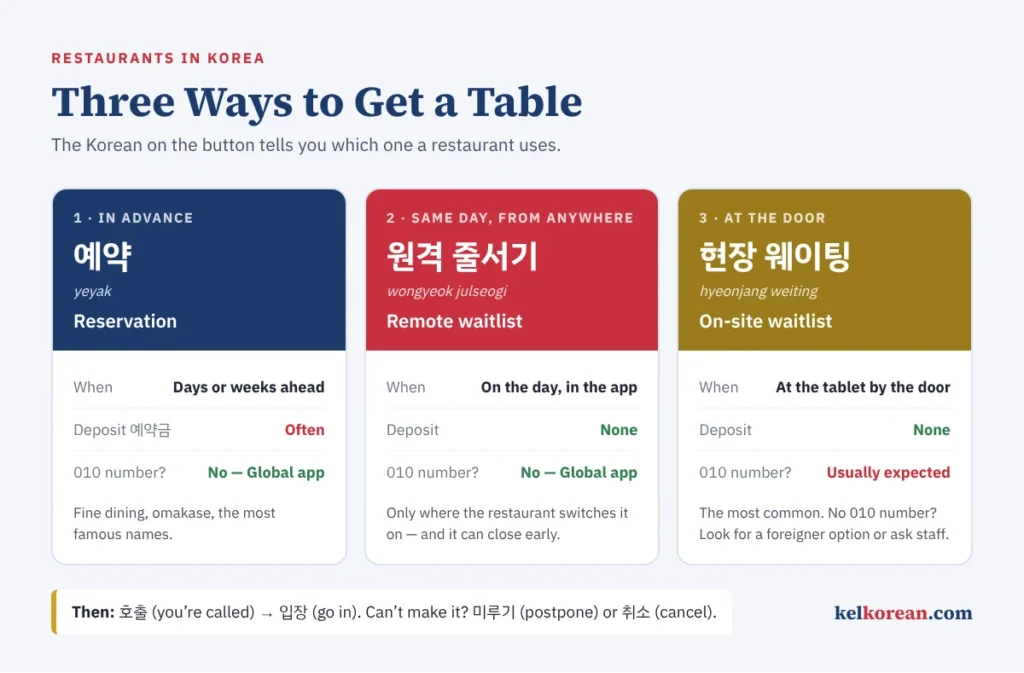
Three Ways to Get a Table
Every restaurant on these apps uses one or more of three methods, and the Korean names are on the buttons.
1. Reservation — 예약 (yeyak). A time slot booked in advance, sometimes weeks ahead. Fine dining, omakase and the most famous restaurants work this way, and many ask for a 예약금 (yeyakgeum), a deposit, to discourage no-shows. In CatchTable Global, the deposit can be paid with an overseas card.
2. Remote waitlist — 원격 줄서기 (wongyeok julseogi), literally “standing in line from a distance.” On the day, you join the queue from the app wherever you are, watch your place move, and walk over when you are close. Not every restaurant switches it on, and some that do close it as soon as the list is long enough. There is no deposit.
3. On-site waitlist — 현장 웨이팅 (hyeonjang weiting). You go to the restaurant and register at the tablet by the door. This is the method you will meet most often, and it is the one that assumes a Korean phone number. Our gomtang restaurant in Haeundae worked this way.
Plenty of ordinary restaurants use none of these. Noodle shops, soup restaurants, markets and late-night places are usually walk-in: you open the door, and someone asks how many of you there are. Our guide to ordering food in Korean starts from that moment.
At the Tablet: Step by Step
Here is the CatchTable tablet at Geodae Gomtang, photographed as we registered. The layout is typical.
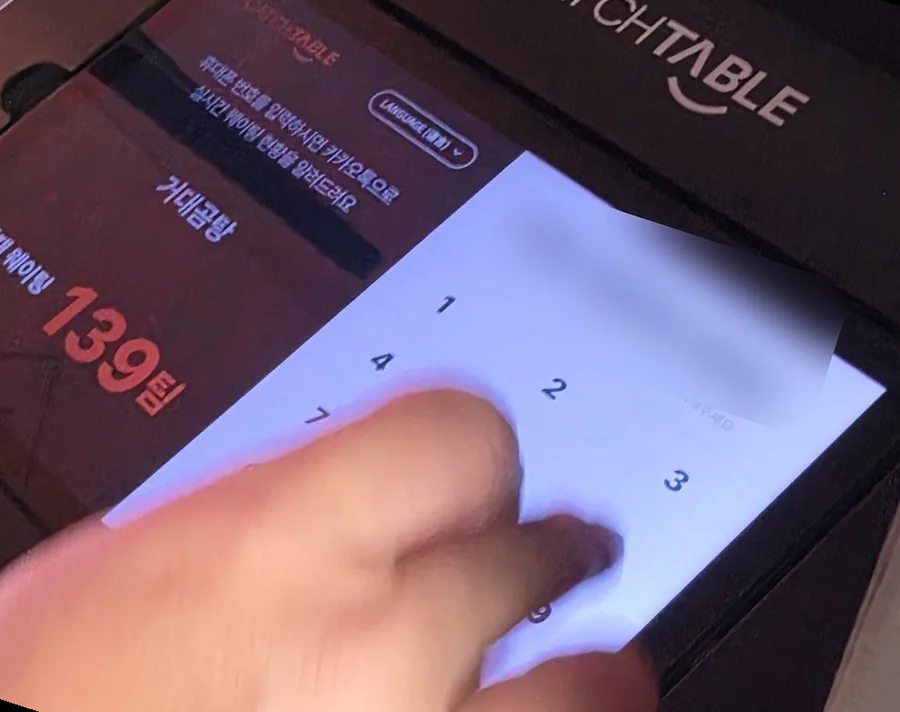
- Look for the LANGUAGE button. On this tablet it sits at the top of the screen, labelled LANGUAGE (언어). Many tablets have one; if yours does, switch to English first.
- Read the queue. The red number is 현재 웨이팅, “currently waiting,” counted in 팀 (tim), teams. One team is one party, whether that is one person or six.
- Enter a phone number. The line at the top of this screen reads 휴대폰 번호를 입력하시면 카카오톡으로 실시간 웨이팅 현황을 알려드려요 — “enter your mobile number and we’ll send live waiting updates by KakaoTalk.” The keypad expects a Korean number starting with 010.
- Give your party size. Most tablets ask for the number of people, sometimes split into 성인 (adults) and 유아 (young children), because the restaurant needs to know what size of table to hold.
- Agree and register. Tick the consent box if there is one, then press 등록 (deungnok), “register,” or 웨이팅 등록. You are now in the queue.
If you do not have a Korean phone number
This is where visitors get stuck, and there is no single answer, because it depends on the tablet and the restaurant. In rough order of how well they work:
- Join from CatchTable Global instead. If the restaurant offers a remote waitlist, do it from the app before you even arrive. Updates come as app notifications and email, with no Korean number involved.
- Look for a foreigner option on the tablet. Some tablets have a button for visitors without a Korean number, or a QR code that opens a web page where you can follow your place in the queue. Not all of them have it yet.
- Use a Korean number from a local SIM or eSIM. A tourist SIM with a 010 number can receive text messages, which is often enough to register at a tablet.
- Ask a member of staff. Show them this sentence: 한국 전화번호가 없어요. 웨이팅 어떻게 해요? — “I don’t have a Korean phone number. How do I join the waitlist?” Staff at busy restaurants deal with this every day, and some will take your name or simply ask you to wait nearby.
KakaoTalk itself can be installed with an overseas number, but the waitlist messages are tied to Korean numbers, so having the app alone does not guarantee you will receive them.
While You Wait
Once you are registered, you are free. You do not need to stand outside, and nobody expects you to. We registered and spent the wait walking along Haeundae Beach. Three habits make it work:
- Keep notifications on and your phone charged. The call to come in is a message, not a shout across the street.
- Stay within a few minutes’ walk. When the count gets down to about ten teams, start heading back. The queue sometimes moves in jumps, when several tables leave at once.
- Cancel if you change your mind. The messages usually include a cancel option, 웨이팅 취소. Using it moves everyone behind you up a place.
When Your Turn Comes
The restaurant presses a button, and you receive a message saying it is time to come in. In Korean this is 호출 (hochul), “calling.” Many restaurants also show the number on a screen at the entrance. At Geodae Gomtang the screen above the door said:
화면에 번호가 뜨면 입장해 주세요. — “When your number appears on the screen, please come in.”
How long you then have depends on the restaurant. In CatchTable’s own settings for restaurant owners, each restaurant chooses how many minutes a guest has after being called, and whether the system should cancel automatically when that time runs out. Some restaurants call twice before giving up. Assume the window is short — a few minutes, not half an hour.
Two features can rescue you:
- Postponing, 미루기 (mirugi). If you know you will be late, you can push yourself further down the list before you are called, either to the back or to a place you choose. CatchTable allows this up to twice per booking, where the restaurant has it switched on.
- Restoring an automatic cancellation. If the system cancels you because you missed the call, CatchTable lets you restore your place yourself within 30 minutes. Do it quickly; the tables keep turning while you decide.
One more message you may see, and one you cannot do anything about: 재고 소진 (jaego sojin), “sold out.” Soup restaurants in particular make a set amount each day, and when it is gone, the remaining queue is cancelled.
How to Wait Less
The 139 teams we faced were the product of the busiest possible combination: a famous restaurant, a public holiday and a meal time. Change any one of those and the number drops. Other diners at the same restaurant have reported waits of ten minutes on an ordinary evening.
- Avoid 12:00–13:30 and 18:00–20:00, the Korean lunch and dinner peaks.
- Go on a weekday if your schedule allows; weekday lunch is often the quietest window of all.
- Arrive at opening, or just before. Many restaurants open the waitlist when they open the door, and the first hour is when the list is shortest.
- Register first, sightsee second. If you are going to wait anyway, start the clock the moment you arrive in the area.
Our guide to telling time in Korean will help with the opening hours, written on every door in the 24-hour clock.
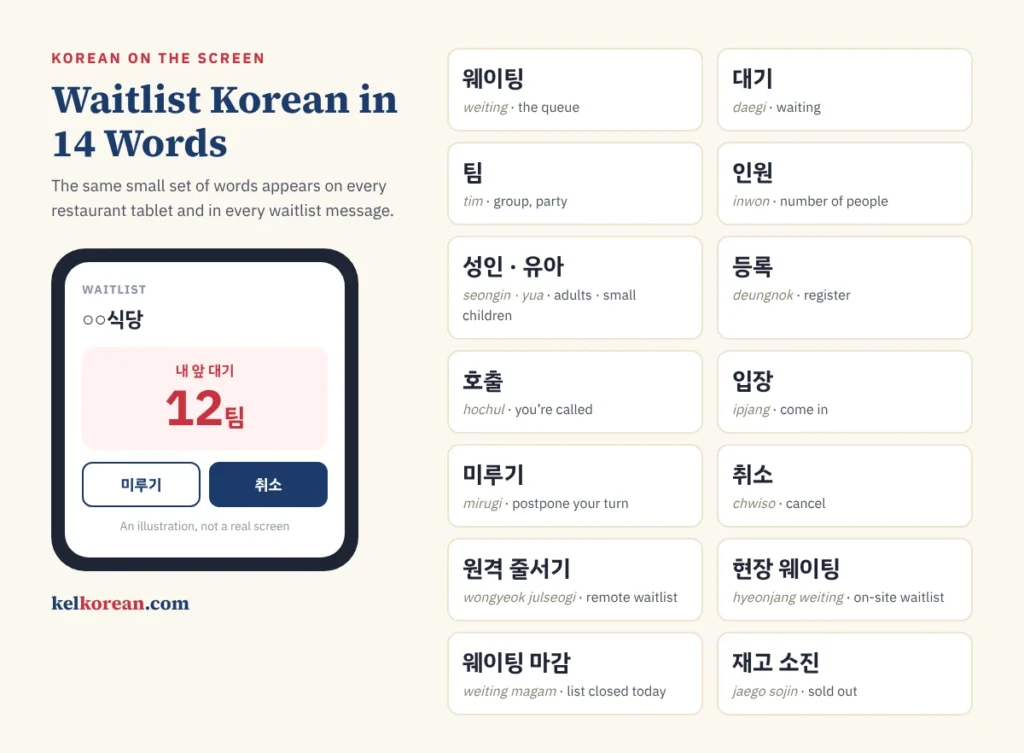
The Korean on Every Waitlist Screen
The tablets and messages use the same small set of words. Half of them are English borrowings written in Hangul, which makes them easier than they look once you can read the letters; our guide to learning Hangul in a week gets you there.
| Korean | Romanisation | Meaning |
|---|---|---|
| 웨이팅 | weiting | Waiting, the queue |
| 대기 | daegi | Waiting (the native word) |
| 현재 웨이팅 ○팀 | hyeonjae weiting ○ tim | ○ groups waiting now |
| 내 앞 대기 ○팀 | nae ap daegi ○ tim | ○ groups ahead of me |
| 인원 | inwon | Number of people |
| 성인 / 유아 | seongin / yua | Adults / young children |
| 등록 | deungnok | Register |
| 호출 | hochul | Called — come in now |
| 입장 | ipjang | Entry, come in |
| 미루기 | mirugi | Postpone your turn |
| 취소 | chwiso | Cancel |
| 원격 줄서기 | wongyeok julseogi | Remote waitlist |
| 현장 웨이팅 | hyeonjang weiting | On-site waitlist |
| 예약 / 예약금 | yeyak / yeyakgeum | Reservation / deposit |
| 웨이팅 마감 | weiting magam | Waitlist closed for today |
| 재고 소진 | jaego sojin | Sold out |
Notice how the counting works. 팀 is borrowed from English, but it counts like a Korean word: 몇 팀 for “how many groups,” and native Korean numbers in front for small amounts — 한 팀, 두 팀, 세 팀. Our guide to Korean counters explains the pattern, and Konglish covers the other English words that changed on the way into Korean.
Four sentences for the door
| Korean | Romanisation | Meaning |
|---|---|---|
| 웨이팅 있어요? | weiting isseoyo? | Is there a wait? |
| 얼마나 기다려야 돼요? | eolmana gidaryeoya dwaeyo? | How long do we have to wait? |
| 한국 전화번호가 없어요 | hanguk jeonhwabeonhoga eopseoyo | I don’t have a Korean phone number |
| 웨이팅 등록했어요 | weiting deungnokhaesseoyo | I’ve put my name on the list |
Install, Register, Walk Away
The whole system comes down to three moves. Install CatchTable Global and switch on its notifications before you land. At the restaurant, register — in the app if it offers 원격 줄서기, at the tablet if not, and with the help of a staff member if the tablet wants a number you do not have. Then walk away and enjoy the neighbourhood until your phone says 호출. Korea’s queues are long, but you are not expected to stand in them.
Before the trip, sort out how you will pay, and keep our Korean phrases for travelers on your phone for everything that happens after you sit down.
Written by Minhyung Cha — 25 years teaching Korean, and 15+ years running an English academy in South Korea. I live and work in Busan, and every example on this site is checked as a native speaker. More about KEL.
Leave a Reply