
Korea travel apps are the one piece of trip planning people leave until the airport, and it is the one that most decides how the first day goes. The reason is a single, stubborn fact: the app you use to get around everywhere else in the world does not do its main job here.
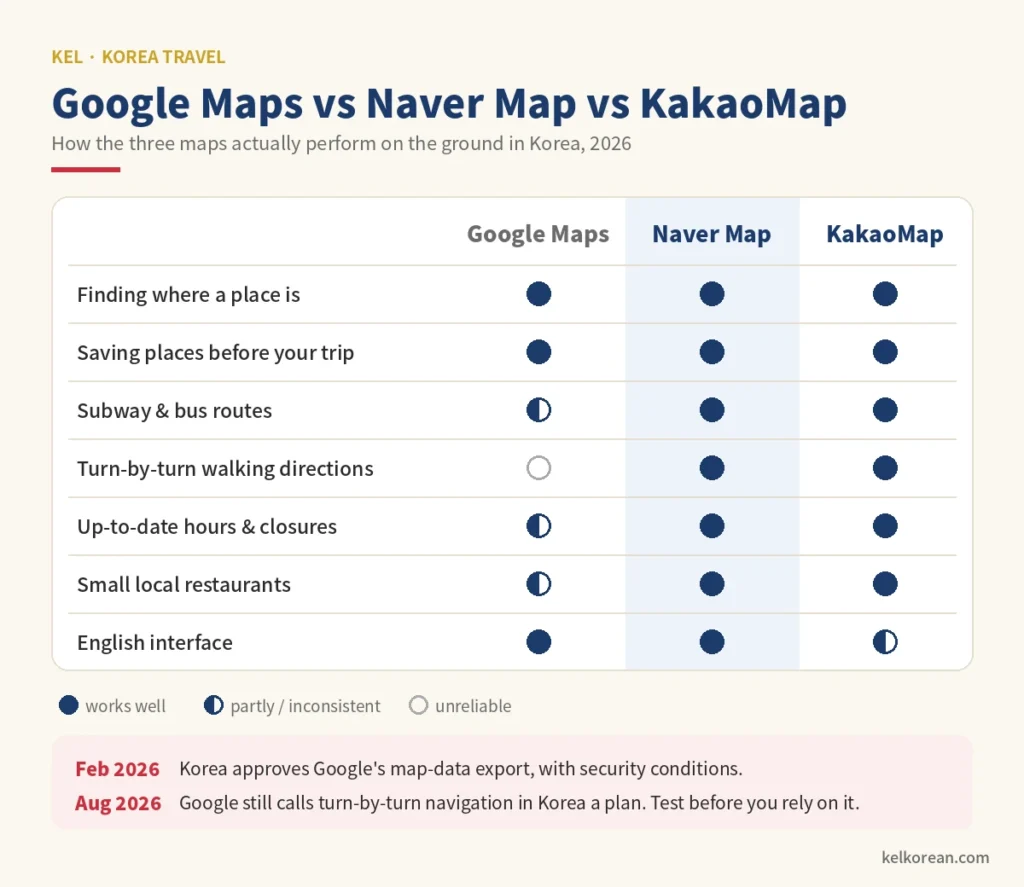
In February 2026, after nearly two decades of refusals, the Korean government finally gave Google conditional permission to take detailed Korean map data abroad. The headlines said Google Maps would at last work in Korea. Six months later, in late August, Google was still describing turn-by-turn navigation here as something it plans to bring — not something you can use today.
So you will land in a country where Google Maps can show you where a café is but cannot reliably walk you to its door. Koreans have never missed it, because they have their own set of apps — for maps, taxis, translation, messaging and food — and for getting around Korea they generally work better than the global versions.
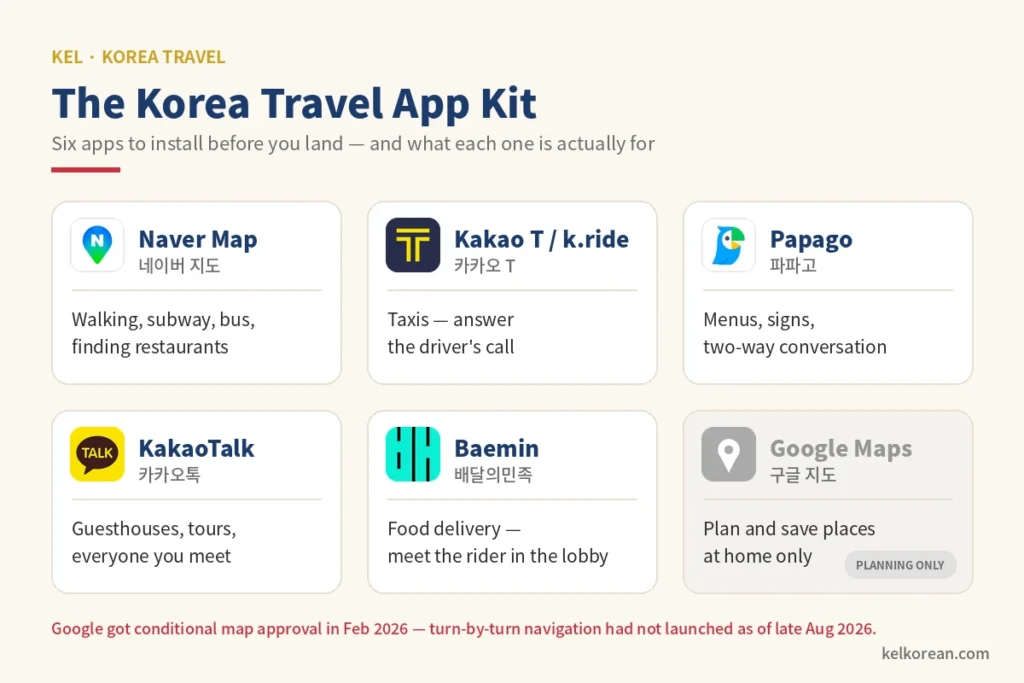
Here are the six worth installing before you fly, what each one is actually for, and the Korean you will see on their screens even when you switch them to English.
Does Google Maps Work in Korea in 2026?
Partly — and the part that does not work is the part you need most.
Korean law restricts sending detailed map data to servers outside the country, on national-security grounds. Google asked for an exemption and was refused twice. Its third request was approved in February 2026 on strict conditions: sensitive military and government sites must be blurred, and the data has to be processed in ways the government can check. That was a real change. But an approval is paperwork, and an app is software; as of late August 2026, Google was still recruiting the team that will bring the full service to Korea.
In practice, this is where things stand:
| Task | Google Maps | Naver Map |
|---|---|---|
| Finding where a place is | Yes | Yes |
| Saving places before your trip | Best — your lists are already there | Yes |
| Subway and bus routes | Basic | Detailed — exit numbers, real-time buses |
| Walking directions | Unreliable | Turn-by-turn |
| Opening hours and closures | Often out of date | Updated by the business |
| Small local restaurants | Patchy | Almost all |
Keep Google Maps. Just demote it. Use it at home to build your list of places, because that is what it does best. Then, in Korea, open each saved place in Naver Map to actually get there. If Google finishes the job while you are reading this, wonderful — test a route from your hotel before you rely on it, and keep Naver as the backup either way.
The Six Apps at a Glance
| App | Korean name | What it replaces | Use it for |
|---|---|---|---|
| Naver Map | 네이버 지도 | Google Maps | Walking, subway, bus, finding restaurants |
| Kakao T / k.ride | 카카오 T | Uber, Lyft | Taxis |
| Papago | 파파고 | Google Translate | Menus, signs, conversations |
| KakaoTalk | 카카오톡 | Messaging guesthouses, tours, new friends | |
| Baemin | 배달의민족 | Uber Eats, DoorDash | Food delivery |
| Google Maps | 구글 지도 | — | Planning and saving places at home |
Subway apps are the one category missing here, and on purpose — our guide to using the Korean subway covers them in full, including which car to board for the fastest transfer.
1. Naver Map — the One Koreans Actually Open
Naver is Korea’s biggest search engine, and Naver Map is the default map for most of the country. It has an English interface, and its transit routes are the best you will find: the exact subway exit to use, the walk from that exit, real-time bus positions, and the last train home.
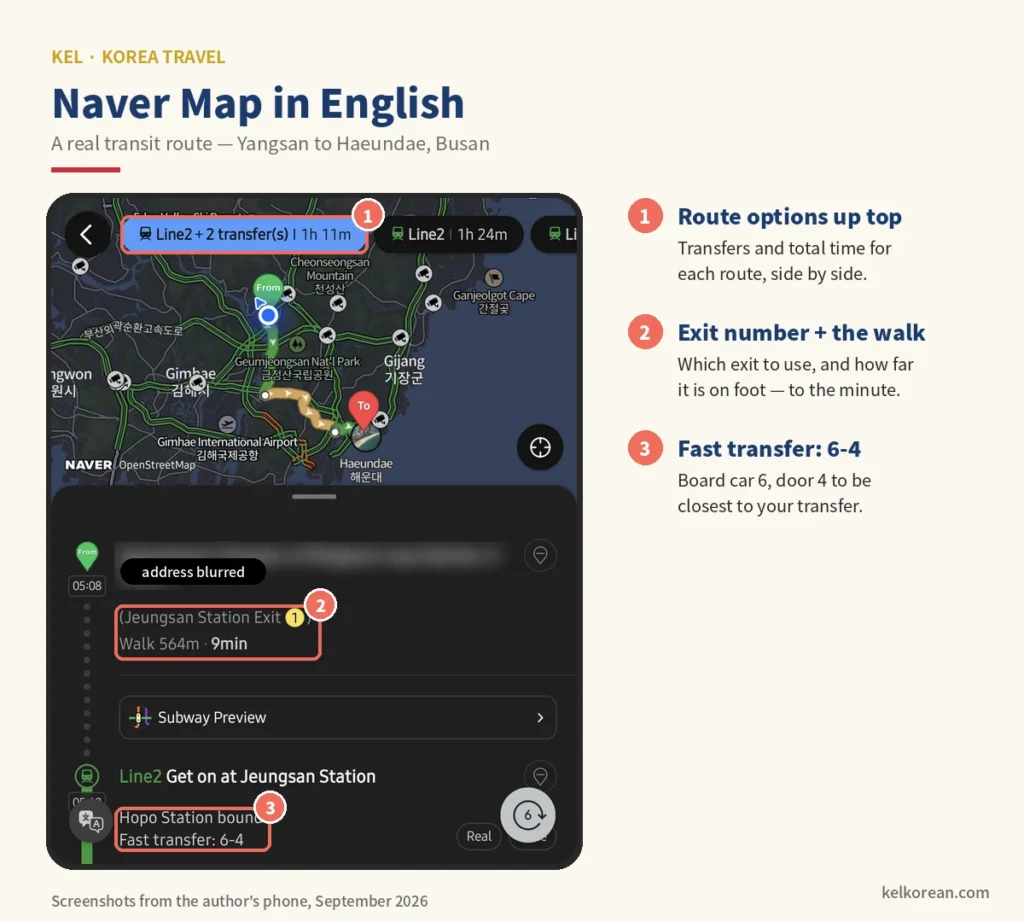
Two search habits make it dramatically better.
Search in Korean whenever you can. Large landmarks come up in English, but a small restaurant is registered under its Korean name, and an English search often returns nothing. Copy the Korean name from anywhere you found it — a blog, a friend’s message, the sign in a photo — and paste it in. If you have learned the alphabet, you can simply type it; our guide on how to type in Korean gets you there in an evening.
Or search by phone number. Almost every business lists one, and a phone number has no spelling problem. Paste it into the search bar and the right place comes up first.
How Koreans read Naver reviews
This is where living here helps. Naver place reviews come in two kinds, and Koreans trust them differently.
Visitor reviews are short, often tied to a receipt, and summarised as keywords — “the food is delicious,” “good for groups,” “the staff are kind” — each with a count. Those keyword counts tell you more than a star score, because they tell you what kind of good the place is.
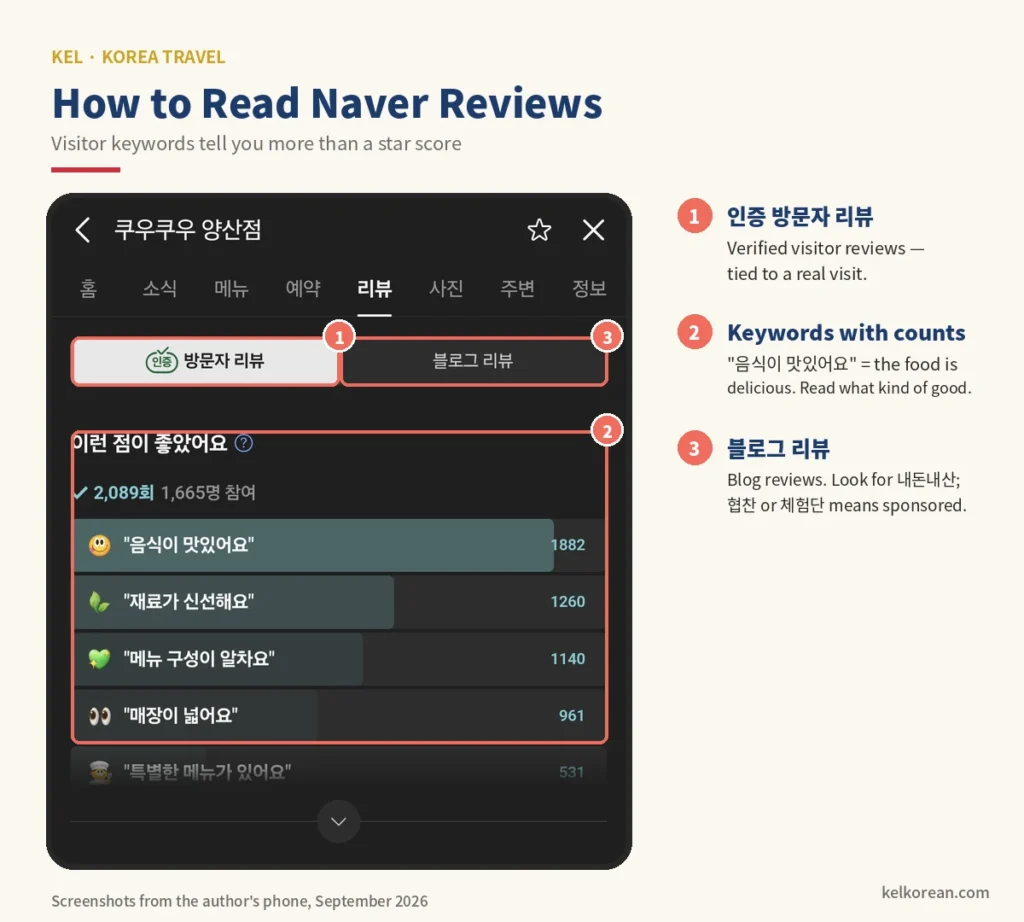
Blog reviews are long posts with dozens of photos, and many of them are sponsored. Koreans look for two labels. 협찬 (hyeopchan) or 체험단 (cheheomdan) means the writer ate for free. 내돈내산 (naedonnaesan) — short for “bought with my own money” — is the phrase bloggers use to announce they paid. It is one of the most useful words in this article.
One more detail that confuses visitors. Naver removed star ratings in 2021, largely to protect small businesses from review-bombing, and brought them back in 2026 — but each business can choose whether its average is shown. A restaurant with no star average is not necessarily hiding anything. Read the keywords.
KakaoMap is the other Korean map, and a perfectly good backup. Some Koreans swear by it for bus timings. If Naver ever fails to find somewhere, try Kakao before you give up.
2. Kakao T — and the Phone Call Nobody Warns You About
Most taxis in Korea take Kakao T calls, so it gives you the fastest pickups and the widest coverage. It has an English mode, shows an estimated fare before you book, and lets you sign up with an overseas phone number.
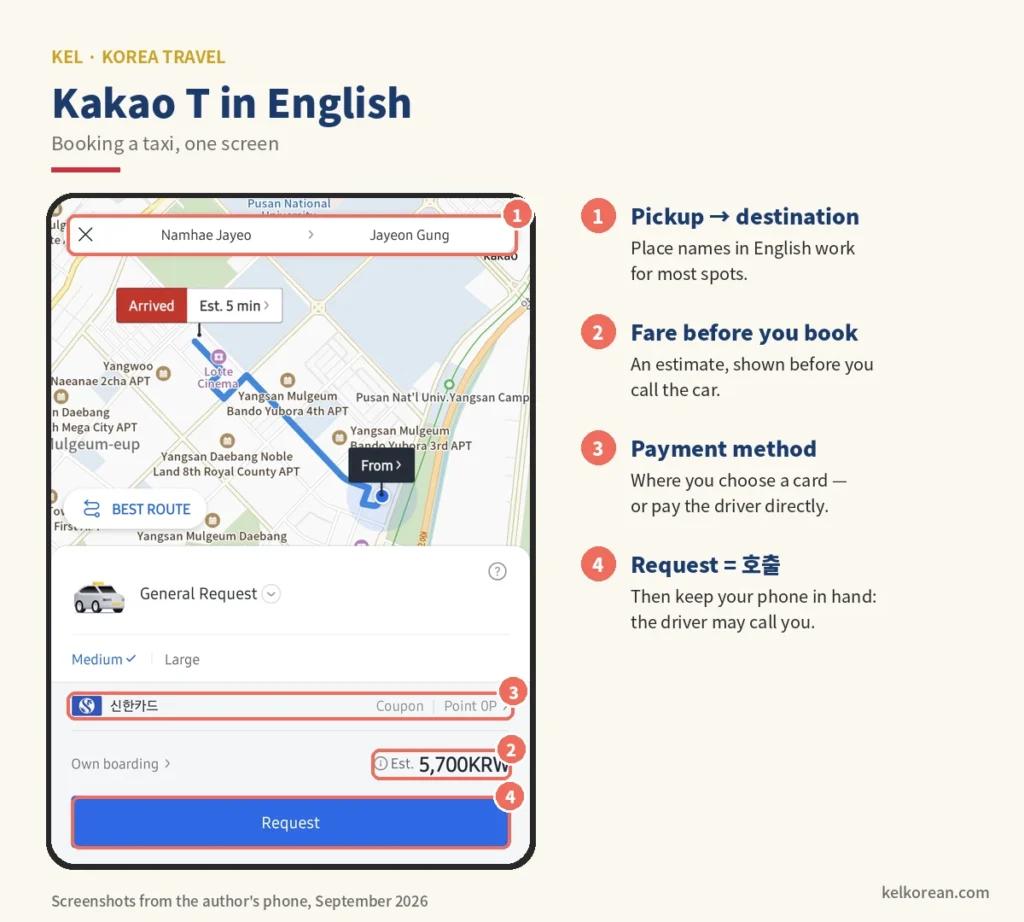
Payment is the catch. Kakao T has an option for non-Korean cards, but whether yours registers depends on the card, and many visitors find it does not. The reliable fallback is pay to driver: book in the app, then pay with your own card or cash when you arrive. Korean taxis take cards as standard.
If you want the fare charged automatically, there are two good alternatives. k.ride is Kakao’s own app for visitors, launched in 2024, which accepts overseas cards and lets you sign in with Google or Apple. And the ordinary Uber app works in Korea too, booking regular licensed taxis, with your existing account.
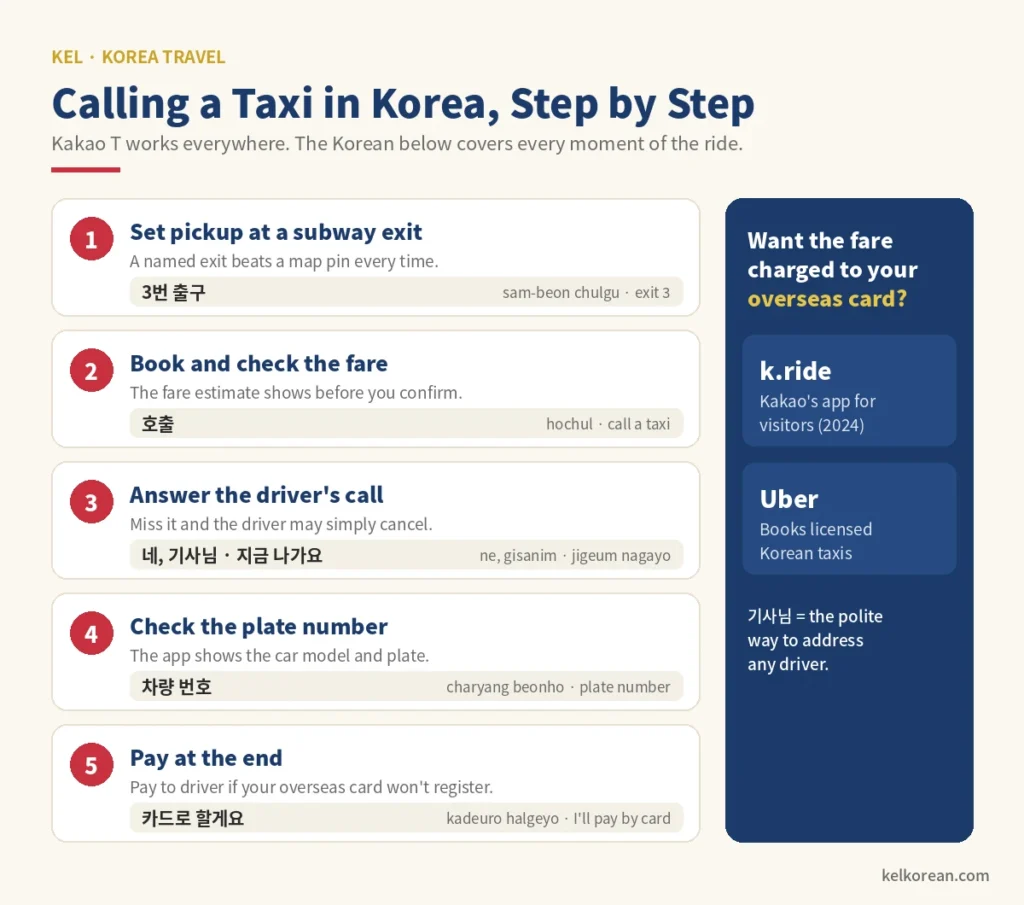
Now the part guides leave out. After a driver accepts your ride, there is a good chance they will phone you — to confirm which side of the road you are on, or which exit. An unknown Korean number flashes on your screen, you decline it as spam, and the driver, unable to find you, cancels. Answer it. You only need a few words:
| Korean | Romanisation | Meaning |
|---|---|---|
| 네, 기사님 | ne, gisanim | Yes, driver — answering the call |
| 3번 출구 앞이에요 | sambeon chulgu apieyo | I’m in front of exit 3 |
| 지금 나가요 | jigeum nagayo | I’m coming out now |
| 여기서 세워 주세요 | yeogiseo sewo juseyo | Please stop here |
| 카드로 할게요 | kadeuro halgeyo | I’ll pay by card |
기사님 is what Koreans call any driver — the polite title, never “taxi” or “excuse me.” Our guide to Korean job titles explains why that -님 matters. And notice the exit number uses 삼, not 셋: exits, floors and bus numbers all take the Sino-Korean system, which our guide to Korean numbers untangles.
3. Papago — the Translator Koreans Use
Papago is Naver’s translator, and it is the one most Koreans reach for when they need Korean. It needs no account, and three features earn it a place on your home screen: camera translation for menus and signs, conversation mode for a two-way chat across a counter, and plain text translation for anything you want to say.
Google Translate’s camera mode works in Korea too, and for a menu the difference is small. Where Papago tends to win is the other direction — turning your English into Korean that sounds like a person wrote it.
Two cautions from a Korean teacher.
Read the ending before you show the screen. A translator does not know who it is talking to. The same request can come out in polite -요 form, in stiff formal -습니다, or in 반말, the casual speech you use with close friends — and showing a shop owner 반말 lands exactly as rudely as you would fear. For a stranger, you want the sentence to end in 요 (or the more formal -니다); if it does not, rephrase more politely and try again. Our guides to Korean honorifics and 반말 show you how to spot the difference at a glance.
Dish names translate literally, and badly. Camera translation will tell you what is in a dish, not what the dish is, and some results are alarming for no good reason. Treat the translation as a hint and ask. Our guide to food in Korean covers the words that appear on nearly every menu, and how to order food in Korean gives you the sentence to ask what something is.
4. KakaoTalk — Everyone’s Phone Line
Koreans rarely text by SMS for everyday conversation, and barely use WhatsApp. It uses KakaoTalk. Guesthouses send check-in instructions on it, tour companies confirm pickups on it, and many small businesses take bookings through a KakaoTalk channel instead of a website.
You can sign up with an overseas number. Do it at home, because the verification text is easier to receive before you swap SIM cards.
The app is so central that it has become a verb. 카톡해 (katokhae) means “message me,” and 카톡 주세요 (katok juseyo) is how a shop asks you to send them a note. When a Korean you meet asks for your 카톡, they mean adding you on KakaoTalk — by ID, QR code or phone number. Once you are in, our guide to Korean texting slang will help with what arrives.
5. Baemin — Delivery Finally Opened Its Doors
Uber Eats left Korea in 2019, so if you open it here you will find nothing. Korea runs on its own delivery apps, and the largest is 배달의민족, known to everyone as Baemin.
Until this year it was hard for visitors to use. That changed quickly in 2026: Baemin added English, Chinese and Japanese in February, and began accepting Apple Pay with overseas cards in June. Sign-up is the remaining hurdle: some visitors are still asked to verify with a Korean phone number, so try it at home before you rely on it. Even so, it now has the best case for being the delivery app on a visitor’s phone. Coupang Eats, the main rival, has had an English interface for longer but is less predictable with foreign cards.
Three practical notes. Plan to meet the rider in the lobby — most hotels do not let delivery staff upstairs. Enter your address in Korean, including the building name. And look out for 포장 (pojang, takeout) next to 배달 (baedal, delivery): many restaurants give a discount if you collect the food yourself.
Korean Addresses Run Backwards — and Nobody Uses Them Out Loud
Every app above will eventually ask you for an address, so it helps to know how Korean ones work.
A Korean address runs from biggest to smallest — the reverse of an English one. Seoul City Hall is 서울특별시 중구 세종대로 110: Seoul, then the district (Jung-gu), then the road (Sejong-daero), then the building number. It is the same logic as Korean dates, which go year, month, day, and Korean names, which put the family name first.
There are two systems in circulation. The road-name address, 도로명주소, officially replaced the old lot-number address, 지번주소, in 2014 — and the old one never quite went away. You will still see lot numbers on older signs and hear them from older people. Both work in Naver Map, so if one fails, paste the other.
And in conversation, Koreans barely use either. Ask for directions and you will hear a landmark and an exit: “Come out of exit 5 at the station, and it’s next to the convenience store.” That is why the single most useful thing to screenshot before you leave home is not your hotel’s address but its Korean name and its nearest subway exit.
The Korean You Will See on Screen
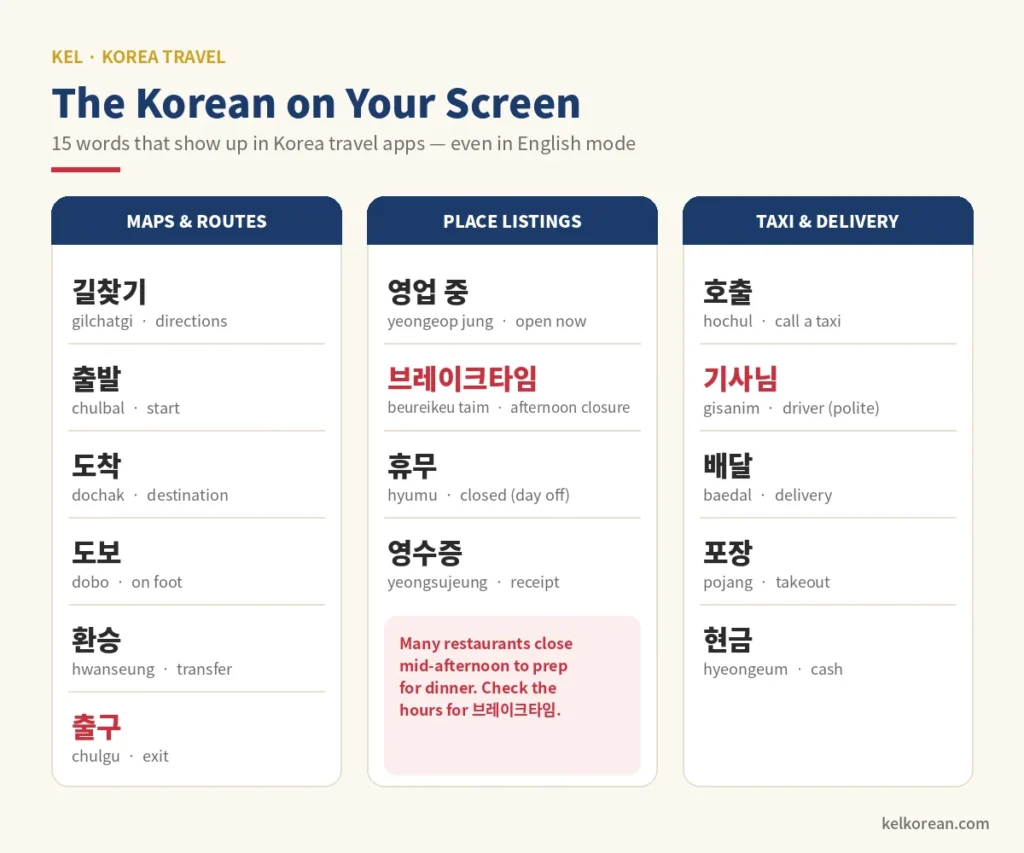
Switch every app to English and Korean will still leak through — on buttons that did not get translated, on business listings, on the driver’s messages. These fifteen words cover almost all of it.
| Korean | Romanisation | Meaning | Where you’ll see it |
|---|---|---|---|
| 길찾기 | gilchatgi | directions | Map apps |
| 출발 | chulbal | start / departure | Map apps |
| 도착 | dochak | destination / arrival | Map and taxi apps |
| 도보 | dobo | on foot | Walking routes |
| 환승 | hwanseung | transfer | Transit routes |
| 출구 | chulgu | exit | Subway routes, pickup points |
| 영업 중 | yeongeop jung | open now | Place listings |
| 브레이크타임 | beureikeutaim | afternoon closure | Restaurant hours |
| 휴무 | hyumu | closed (day off) | Place listings |
| 호출 | hochul | call (a taxi) | Kakao T |
| 기사님 | gisanim | driver (polite) | Kakao T messages |
| 배달 | baedal | delivery | Baemin |
| 포장 | pojang | takeout | Baemin, restaurants |
| 현금 | hyeongeum | cash | Payment options |
| 영수증 | yeongsujeung | receipt | Reviews, payment |
브레이크타임 deserves a special warning. Many Korean restaurants close for an hour or two in mid-afternoon to prepare for dinner, and a hungry visitor who arrives at 3:30 finds the door locked and the lights on. Naver Map lists the break in the hours. It is also a small piece of Konglish — an English phrase Korea uses in a way English does not.
Before You Land: A Ten-Minute Setup
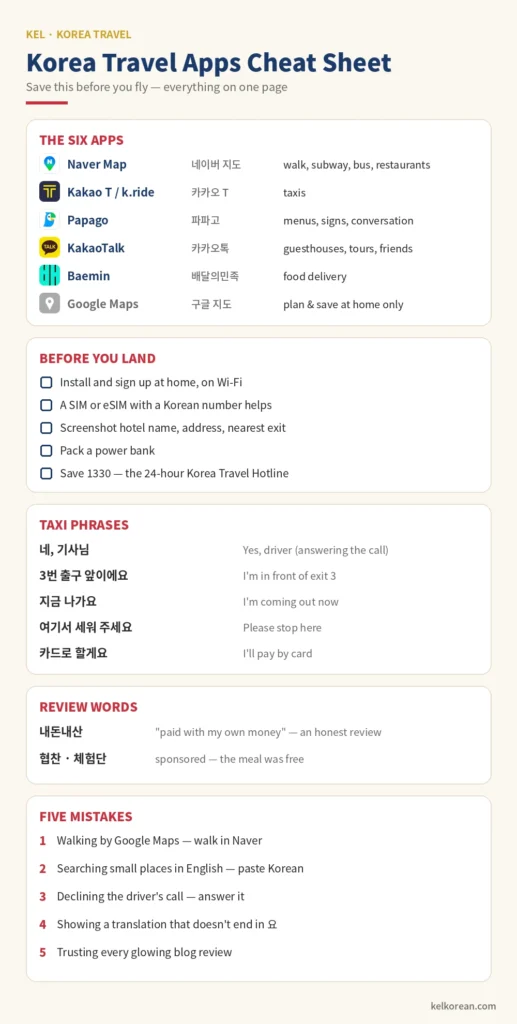
Install and sign up at home, on Wi-Fi. Verification codes, card registration and language settings are all easier at your kitchen table than in an arrivals hall.
Think about your data plan. Every app here needs a connection, and several verify you by text message. Some tourist SIM and eSIM plans include a Korean phone number, and that number removes a surprising amount of friction. A data-only plan works, but expect the odd sign-up to stall.
Screenshot your hotel’s Korean name, address and nearest exit. It is the one thing every taxi driver, delivery rider and passer-by can read.
Carry a power bank. Six apps and a day of navigation will empty a phone by late afternoon, and an empty phone makes all of them useless at once.
Save one number: 1330. It is the Korea Travel Hotline, run by the national tourism organisation, answering in English and several other languages around the clock. If an app fails you and a conversation is going nowhere, call it and hand the phone over.
And learn the handful of spoken phrases no app replaces — our essential Korean phrases for travellers are the place to start.
Frequently Asked Questions
Does Google Maps work in Korea in 2026?
For finding and saving places, yes. For walking and driving directions, not reliably. Korea approved Google’s request to export detailed map data in February 2026, but as of late August Google was still describing full turn-by-turn navigation as a plan. Use Naver Map to get around, and check Google again before your trip in case it has launched.
Naver Map or KakaoMap — which is better for tourists?
Naver Map, for most visitors. It has the stronger English interface and the most complete business listings. KakaoMap is an excellent backup and some Koreans prefer it for buses. Installing both costs nothing.
Can I use Kakao T with a foreign credit card?
Sometimes. There is a non-Korean card option, but many overseas cards will not register. Choose “pay to driver” and tap your card in the taxi, or use k.ride or Uber, both of which charge overseas cards automatically.
Do I need a Korean phone number to use these apps?
Not for most of them any more. Kakao T, k.ride and KakaoTalk accept overseas numbers; Baemin may still ask for a Korean number at sign-up. A Korean number makes everything smoother, so it is worth having if your SIM plan offers one.
Set Up Your Phone, Then Enjoy the Easy Part
Korea is one of the easiest countries in the world to travel through — once your phone is set up for it. The trains are on time, the taxis are cheap, the food arrives in twenty minutes, and all of it runs through a set of apps most visitors have never heard of before they land.
The apps will also teach you Korean whether you mean them to or not. After a week of 출구 and 도보 and 영업 중, you will read those words faster than their English labels. If that sparks something, learning Hangul in a week is the natural next step — it turns every screen, sign and menu in this article into something you can simply read.
If Busan is on your route, our guide to the best time to visit Busan will help you pick your dates. Install the apps tonight. Your first day will thank you.
Written by Minhyung Cha — 25 years teaching Korean, and 15+ years running an English academy in South Korea. I live and work in Busan, and every example on this site is checked as a native speaker. More about KEL.
Leave a Reply