Almost everyone who looks up how to type in Korean arrives with the wrong mental model, and it is not their fault. They have seen how Japanese and Chinese are typed — you enter the sound in Latin letters, a list of candidates pops up, and you choose one. Nihon becomes 日本 after you pick it out of a menu.
So people assume Korean works the same way. Type annyeong, get 안녕.
It does not. There is no romanisation and no candidate list. You press ㅇ, then ㅏ, then ㄴ, and the letters land on screen as themselves. Of the three major East Asian writing systems, Korean is the only one where nothing ever has to be chosen from a menu — because it is the only one built out of letters.
That changes the whole question of how to type in Korean. It is not a technique to master. It is a map with twenty-six positions on it — and the map is sorted in a way almost nobody explains, which is why most learners hunt and peck for months when an evening would do.
There Is No Conversion Step
Start here, because it removes a fear.
In Japanese, writing anything with kanji in it is a two-stage act: you enter kana or romaji, then convert to the mixed form you actually wanted, choosing between homophones. In Chinese, pinyin input hands you a list of characters that all sound alike and asks you to pick. Both require you to approve what you typed.
Korean asks for nothing. Each keystroke is a letter, and letters do not need approving. You type ㅎ ㅏ ㄴ and 한 appears. There is no menu, no space-bar confirmation, no homophone to resolve. The software does one job on your behalf — stacking your letters into square syllable blocks, which the section below walks through — and it never asks you a question while doing it.
There is one optional extra: Hanja conversion. If you want 韓 instead of 한, you press a dedicated key and pick from a list. Koreans use it rarely — a name on a legal document, a technical term in academic writing. Most people go a year of texting without touching it.
One honest caveat, because it will confuse anyone who goes looking. macOS does ship two romanisation-based Korean input sources, GongjinCheong Romaja and HNC Romaja, which let you type hangug and get 한국. No Korean uses them, no Korean school teaches them, and no phone offers them — learn them and you will be unable to type on anyone else’s computer. Set your Mac to 2-Set Korean and forget the others exist.
The upside is that typing and reading reinforce each other from day one. You cannot type a syllable you cannot spell — which is why people who learn Hangul properly in a week find typing takes an evening, and people who skipped straight to romanisation find it takes months.
Turning It On: Four Devices, Four Menus
The setup is genuinely small on every platform. Here is the whole thing.
| Device | Where to add it | How to switch to Korean |
|---|---|---|
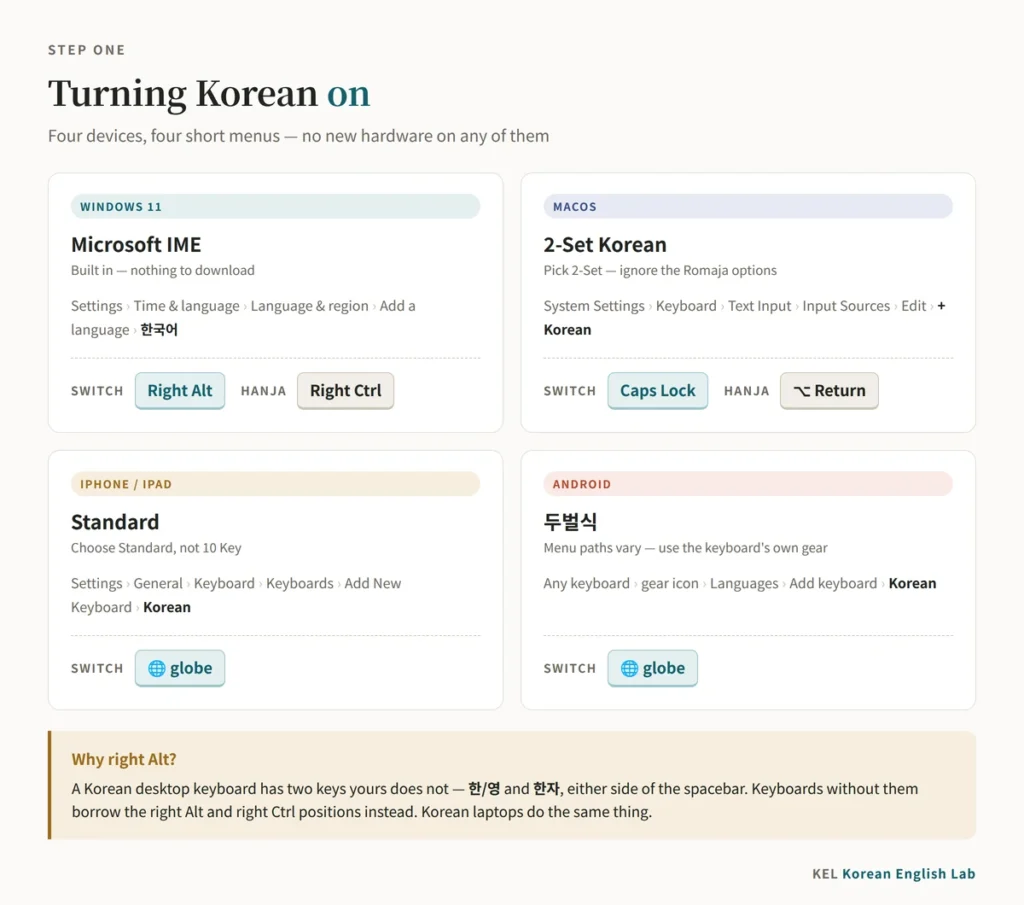
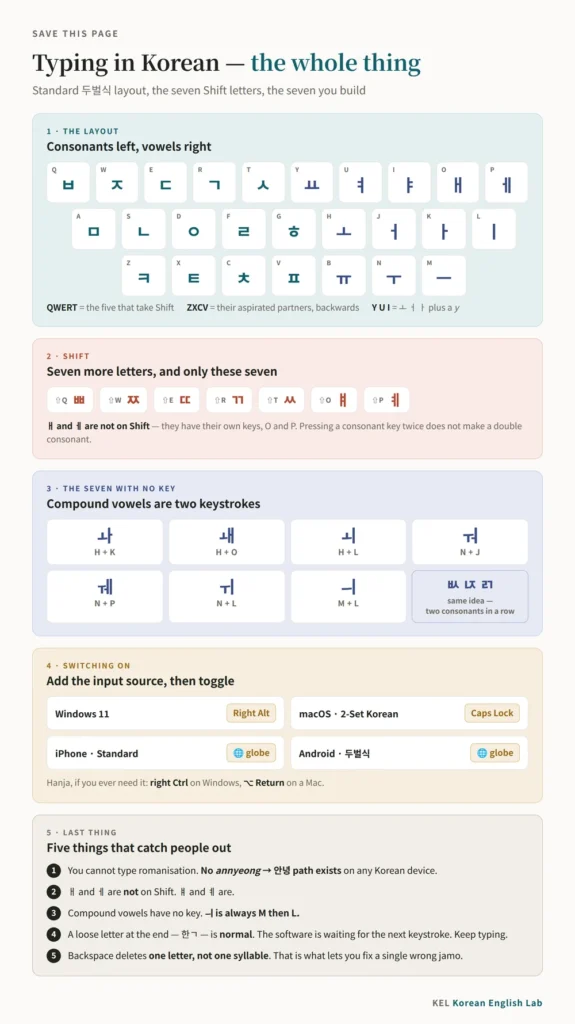
| Windows 11 | Settings → Time & language → Language & region → Add a language → 한국어 → install, then pick Microsoft IME | Right Alt |
| macOS | System Settings → Keyboard → Text Input → Input Sources → Edit → + → Korean → 2-Set Korean | Caps Lock (switch that option on in the same panel), or Control-Space |
| iPhone / iPad | Settings → General → Keyboard → Keyboards → Add New Keyboard → Korean → choose Standard or 10 Key | The 🌐 globe key |
| Android | Open any keyboard → gear icon → Languages → Add keyboard → Korean, then pick a layout (두벌식 is the computer one) | The 🌐 globe key |
Three notes that save people an hour of searching.
The right Alt key on Windows is not a coincidence. A Korean desktop keyboard has two dedicated keys either side of the spacebar — 한/영 and 한자 — that yours does not. Microsoft’s Korean IME solves that by mapping the same two functions onto right Alt and right Ctrl, which is why a US keyboard gets the Korean behaviour with no hardware at all. It is also what Korean laptops do, since they have no room for the extra keys.
On a Mac, the default toggle is Caps Lock, which surprises people. Once Korean is installed, a quick tap of Caps Lock flips between Hangul and your last Latin input source; holding it still gives you capitals. It is the single nicest piece of Korean typing ergonomics on any platform, and it is buried in a settings checkbox.
On a phone, choose the full keyboard first. Apple calls it Standard, Android calls it 두벌식, and it matches what you will use on a computer. The other option — 10 Key on an iPhone, 천지인 on Android — is the traditional Korean keypad, covered further down: a beautiful thing, but not where a learner should start. Android menu paths move between versions and manufacturers, so the keyboard’s own gear icon is the reliable route.
The Left Hand Is Consonants, the Right Hand Is Vowels
This is the structural fact of the standard Korean layout, and it is the first thing to internalise.
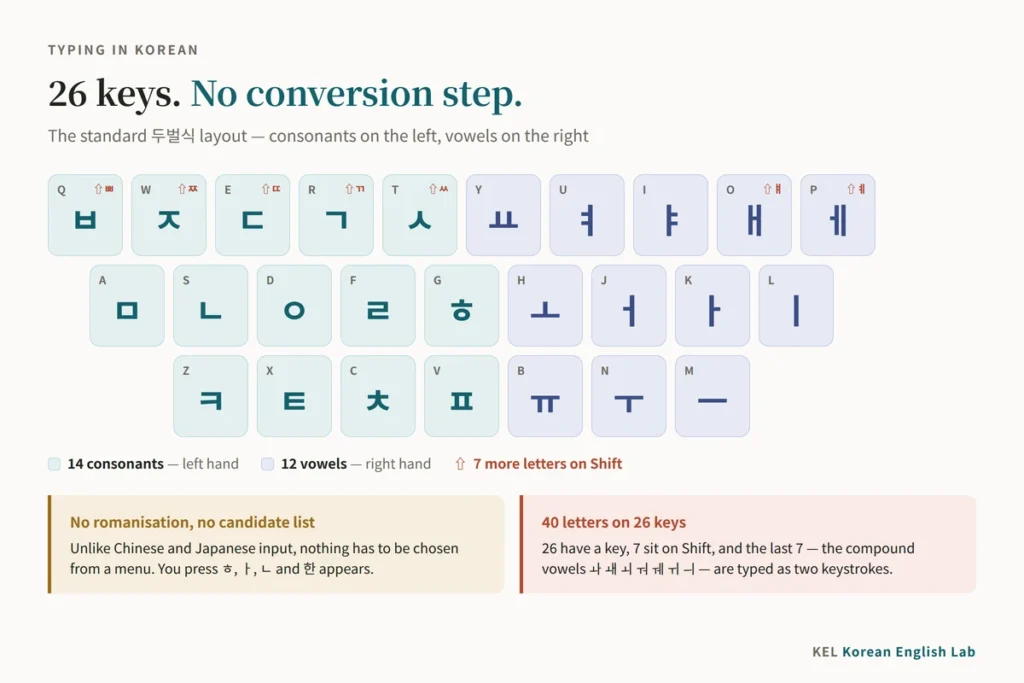
Every consonant is on the left half of the keyboard. Every vowel is on the right half.
| Row | Left hand — consonants | Right hand — vowels |
|---|---|---|
| Top | Q ㅂ · W ㅈ · E ㄷ · R ㄱ · T ㅅ | Y ㅛ · U ㅕ · I ㅑ · O ㅐ · P ㅔ |
| Home | A ㅁ · S ㄴ · D ㅇ · F ㄹ · G ㅎ | H ㅗ · J ㅓ · K ㅏ · L ㅣ |
| Bottom | Z ㅋ · X ㅌ · C ㅊ · V ㅍ | B ㅠ · N ㅜ · M ㅡ |
Now look at what a Korean syllable is. It is a consonant, then a vowel, and often a consonant again — 한 is ㅎ + ㅏ + ㄴ, 국 is ㄱ + ㅜ + ㄱ. Our guide to writing your name in Korean works through that stacking in detail.
Which means typing Korean forces your hands to alternate. Left, right, left. Left, right. Korean produces that pattern automatically, sentence after sentence, without anyone having to design a word for it. English does no such thing — minimum is seven keystrokes, every one of them under the right hand. Korean is, mechanically, a pleasant language to type.
One caveat about the split. It divides the keyboard, not your fingers, and there is exactly one key that straddles the line: B, which carries the vowel ㅠ but is struck by the left index finger in standard touch typing. Everything else falls where you would expect.
The Layout Is Sorted by Sound
Here is the part that is missing from nearly every English-language guide, and it is the difference between memorising twenty-six arbitrary positions and learning three patterns.
The Korean layout is not sorted by frequency. It is sorted by phonetics.
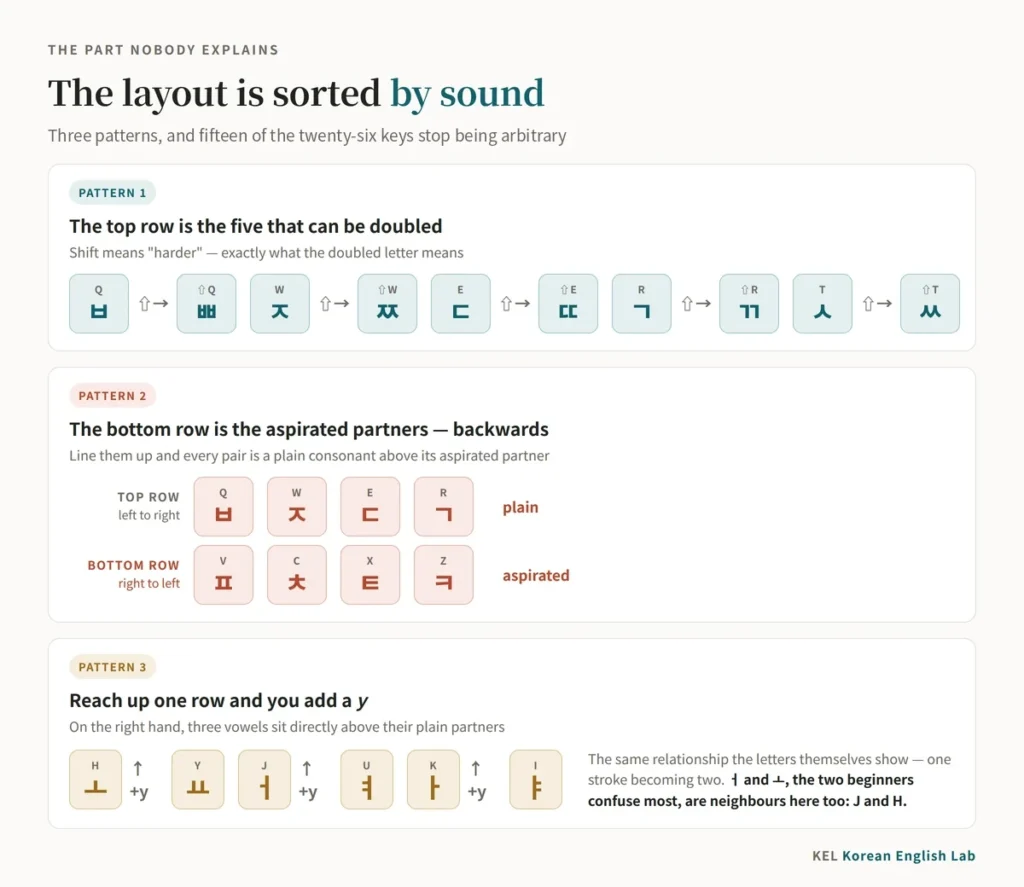
Pattern one: the top row is the five that can be doubled
Korean has five tense consonants — ㄲ ㄸ ㅃ ㅆ ㅉ — and they are written as doubled versions of ㄱ ㄷ ㅂ ㅅ ㅈ.
Those five plain consonants are all on the top row, in a block, and Shift gives you the tense version of each.
| Key | Plain | With Shift |
|---|---|---|
| Q | ㅂ | ㅃ |
| W | ㅈ | ㅉ |
| E | ㄷ | ㄸ |
| R | ㄱ | ㄲ |
| T | ㅅ | ㅆ |
That is not a coincidence — it is why they were put there. Shift means “harder,” exactly as the doubled letter does. If you are still working out what those tense sounds do in the mouth, our guide to plain, aspirated and tense consonants is the companion piece; the keyboard has already made the argument that they are a set.
Pattern two: the bottom row is the aspirated partners, backwards
The four aspirated consonants ㅋ ㅌ ㅊ ㅍ sit on Z X C V. Their plain partners ㄱ ㄷ ㅈ ㅂ sit on Q W E R.
Read the two rows against each other and the pairing is a mirror: ㅂ (Q) with ㅍ (V), ㅈ (W) with ㅊ (C), ㄷ (E) with ㅌ (X), ㄱ (R) with ㅋ (Z).
The bottom row is the top row’s aspirated partners in reverse order. ㅂ is the first key of the top four and ㅍ is the fourth of the bottom four; ㄱ is the fourth and ㅋ is the first. Once you see that mirror you never lose ㅋ ㅌ ㅊ ㅍ again.
Pattern three: the y-vowel sits directly above the plain one
On the right hand, three keys sit in perfect vertical pairs — ㅗ on H with ㅛ on Y above it, ㅓ on J with ㅕ on U, ㅏ on K with ㅑ on I.
Reach up one row and you add a y. That is exactly the relationship the letters themselves show, one stroke becoming two. The two vowels beginners confuse most, ㅓ and ㅗ, are neighbours here too: J and H, side by side.
Three patterns, and fifteen of the twenty-six keys stop being arbitrary.
Forty Letters, Twenty-Six Keys
Modern Hangul has forty letters: nineteen consonants and twenty-one vowels. The keyboard has twenty-six keys.
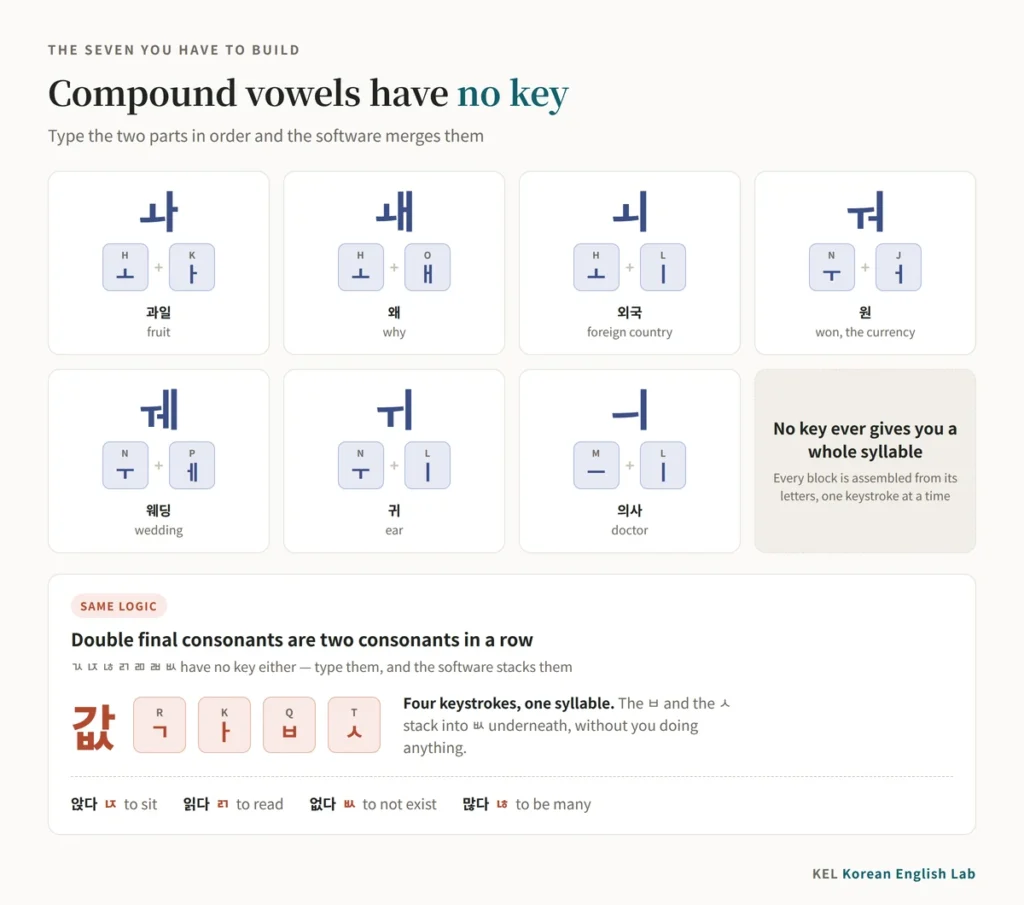
The arithmetic works out exactly. Twenty-six letters have their own key. Seven more live on Shift — the five tense consonants, plus ㅒ on Shift-O and ㅖ on Shift-P. The last seven are compound vowels with no key at all, and each is simply its two parts typed in order:
| Vowel | Type | Keys | Example |
|---|---|---|---|
| ㅘ | ㅗ + ㅏ | H, K | 과일 gwail, fruit |
| ㅙ | ㅗ + ㅐ | H, O | 왜 wae, why |
| ㅚ | ㅗ + ㅣ | H, L | 외국 oeguk, foreign country |
| ㅝ | ㅜ + ㅓ | N, J | 원 won, the currency |
| ㅞ | ㅜ + ㅔ | N, P | 웨딩 weding, wedding |
| ㅟ | ㅜ + ㅣ | N, L | 귀 gwi, ear |
| ㅢ | ㅡ + ㅣ | M, L | 의사 uisa, doctor |
The same logic covers the double final consonants. 값 ends in ㅄ, 앉다 has ㄵ, 읽다 has ㄺ — none has a key either. Type the two consonants in a row and the system stacks them: 값 is ㄱ, ㅏ, ㅂ, ㅅ, which is R K Q T. Four keystrokes for one syllable.
Two things beginners get backwards. ㅐ and ㅔ are not on Shift — they have their own keys, O and P; it is ㅒ and ㅖ that need Shift. And there is no “press it twice” shortcut for a tense consonant: R R gives you two separate ㄱ, not ㄲ. Hold Shift. Repeated keys are, however, exactly how ㅋㅋㅋ (Z Z Z) and ㅠㅠ (B B) get typed, which is why they are everywhere in Korean messaging — our guide to Korean texting slang explains what they mean.
No key ever produces a whole syllable block. The block is always assembled from its letters, which is the point of the next section.
The Block Rebuilds Itself While You Watch
This is the part that makes beginners think something has gone wrong, and it is the single most common reason people give up in the first ten minutes.
Korean syllables are square. Letters are linear. The software reconciles the two in real time — which means the thing on your screen changes shape as you type.
Watch 한국 being typed, one keystroke at a time:
| Keystroke | Letter | On screen |
|---|---|---|
| G | ㅎ | ㅎ |
| K | ㅏ | 하 |
| S | ㄴ | 한 |
| R | ㄱ | 한ㄱ |
| N | ㅜ | 한구 |
| R | ㄱ | 한국 |
Look at step three. 한 appears, but its ㄴ is provisional: if the next key were a vowel, the ㄴ would jump forward and the screen would show 하나 instead. At step four the ㄱ cannot join ㄴ as a double final, so it starts a new block on its own and waits for its vowel. The ambiguity is real and the software is right to wait.
This is also why, while you are still typing a word, Backspace deletes one letter, not one syllable. Press it once after 한국 and you get 한구. That is what lets you fix a single wrong jamo without retyping the block.
The practical rule: do not stop to check each block. Type the whole word, then look. Learners who check after every keystroke type at a quarter speed and panic twice per word; learners who trust the software and check at the space bar are fine by day two.
Your Phone’s Korean Keyboard Was Designed in 1443
Now the good part.
Tap 10 Key on an iPhone, or the ten-key option in Gboard, and you get a 3 × 4 grid — the traditional Korean phone keypad, called 천지인 (cheonjiin, “heaven, earth, person”). It has only three vowel keys:
ㆍ · ㅡ · ㅣ
And from those three you can build every vowel in the language. ㅣ plus ㆍ gives ㅏ. ㆍ plus ㅣ gives ㅓ. ㆍ above ㅡ gives ㅗ; below it gives ㅜ. Tap the dot twice and you get the y-vowels.
That is not a clever compression trick invented by an engineer. It is the vowel system of the 훈민정음, applied literally. When Hangul was designed in 1443, the vowels were built from exactly three marks: a dot for heaven, a horizontal line for earth, a vertical line for a person. Our article on Hangul Day covers that design and the manual that explains it.
The keypad was developed in 1994 and went into Samsung’s Anycall phones, where it became a signature feature. Its patent history is messier than its design — a Samsung employee and a separate inventor, 조관현, each fought Samsung in court through the 2000s before 조관현 gave up his patent rights — and in 2011 천지인 became a Korean national standard. Rival keypads such as 나랏글 survived alongside it, which is why your phone may offer more than one Korean keypad.
Six hundred years separate the design principle from the phone keypad, and the principle needed no modification. There is nothing else like it in consumer technology.
The honest half. 천지인 is slow. Building ㅚ out of three separate taps costs keystrokes, and when a syllable’s final consonant and the next syllable’s initial sit on the same key you have to nudge the cursor manually to keep them apart. My own impression, and that of most Koreans I ask, is that the full QWERTY Hangul keyboard has been steadily winning younger users — though I have never seen a proper survey of it. If you want the fastest route, use Standard. Try 천지인 once anyway, because it is the most elegant object in Korean computing.
What Is Actually on a Korean Keyboard
A few things that make more sense once you have seen a real one.
Two extra keys. A Korean keyboard is the keyboard you already have plus a dedicated 한/영 key and a dedicated 한자 key. On full-size boards they sit either side of the spacebar; on compact boards and laptops they take over the right Alt and right Ctrl positions. That is the whole hardware difference — which is why any keyboard in the world becomes a Korean keyboard with a settings change, and why keyboards without those two keys borrow the right Alt and right Ctrl positions instead.
The layout you are learning has a name and a date. It is 두벌식 (dubeolsik, “two-set”) — two sets of letters, consonants and vowels — and it became the national computing standard in 1982, as KS C 5715. Its standard number has since changed to the one you will see quoted today, KS X 5002, but the layout itself has not moved in forty years.
There was a rival, and it was better. 세벌식 (sebeolsik, “three-set”) splits the letters three ways, matching the three positions in a syllable block: initial consonant, vowel, and final consonant. Because a final ㄱ gets its own key, separate from an initial ㄱ, the software never has to guess where a syllable ends — the ambiguity you saw at step three above simply does not arise. It was invented in 1949 by 공병우, an ophthalmologist whose typewriter is conventionally called the first practical Korean one. Earlier machines existed and failed; his worked. His devotees have argued for seventy years that the country standardised on the wrong layout.
The history is a short, unhappy sequence:
| Year | What happened |
|---|---|
| 1949 | 공병우 builds the first workable Korean typewriter, on a three-set layout |
| 1969 | The government standardises a four-set layout for typewriters instead |
| 1982 | 두벌식 is made the national standard for computers |
| 1980s | Typewriters follow computers onto 두벌식, and the four-set standard is dropped |
두벌식 won on simplicity, not on merit — fewer keys, an easier fit onto an English keyboard, a shorter learning curve. By the time computers were fast enough to make the guessing problem invisible, the argument was over. 세벌식 is still supported on Windows, macOS and Linux, and still used by a small, extremely opinionated minority.
Korean Typing Speed Is Measured in 타, Not Words
Korea does not count words per minute. It counts 타 (ta) — keystrokes per minute.
The reason is structural. A Korean syllable takes between two and four keystrokes, and a “word” can be one syllable or six, so words per minute measures nothing. Keystrokes are the only stable unit.
There is no official grading scale, but the bands Koreans quote to each other are consistent enough to be useful: under 200타 means you are still looking at the keyboard, 300–400타 is ordinary office speed and where most people settle, and 500타 and above marks someone who types for a living. Treat those as folk convention rather than a standard.
Do not compare a 타 score to an English WPM score. They count different things, and the conversion people attempt is usually wrong in the flattering direction.
Here is the part that is invisible from outside Korea. An entire generation of Koreans learned to type from a video game. Through the 1990s, school computer rooms and after-school 컴퓨터 학원 ran typing tutors whose falling-word games did the actual teaching. 한메타자교사, first released in 1989, had 베네치아, set in a ruined Venice where words drop onto the one surviving tower and knock its blocks away unless you type them. Its rival 한컴타자연습 had 산성비 — “acid rain” — on much the same principle. The two ran side by side for a decade, and which name a Korean says first tells you roughly what year they were in school.
Ask anyone over thirty about 베네치아 and you will get an immediate, specific reaction. Typing speed was a graded school skill and a line on a résumé, and falling words are still the best way to practise: find a 타자연습 site, ignore the Korean interface, and let the game do what flashcards cannot. Twenty minutes a day for a week is the whole curriculum.
Frequently Asked Questions
How do I type in Korean on a normal English keyboard?
You add the Korean input source in your operating system’s language settings and then switch to it — right Alt on Windows, Caps Lock or Control-Space on a Mac. No new hardware and no stickers required. Your existing keys become Hangul keys: Q is ㅂ, W is ㅈ, and so on across the board.
Do I need a Korean keyboard to type Korean?
No. A Korean keyboard is a standard keyboard with two extra keys and Hangul printed on the keycaps. The printing helps while you are learning, but a set of keycap stickers costs a few dollars and an evening of practice makes both unnecessary.
How long does it take to learn to type in Korean?
An evening to find all the keys, about a week of daily use to stop looking down, and a month to reach a comfortable speed. It is far quicker than typing in Japanese or Chinese, because there is nothing to learn beyond the positions — and if you cannot spell a word in Hangul, you cannot type it, which makes typing an honest test of the alphabet. Our first 100 Korean words is a good stock of things to practise on.
Three Patterns and a Home Row
Learning to type in Korean is a smaller job than it looks, and it pays back faster than almost anything else a learner can do in a week. It turns your phone into a practice device, it makes Korean search results and dictionaries reachable, and because you cannot type what you cannot spell, it quietly forces the alphabet to become real.
If you are starting today: install it now, learn the home row — ㅁ ㄴ ㅇ ㄹ ㅎ on the left, ㅗ ㅓ ㅏ ㅣ on the right — and type your own name. Then check the stroke order so you can write it by hand too, and pick up the beginner’s roadmap for what comes after the alphabet.
The three patterns are worth one more read before you close this. Shift on the top row gives you the tense consonants. The bottom row is the aspirated partners, backwards. Reaching up one row on the right hand adds a y. Learn those and the keyboard stops being twenty-six things to memorise — which is exactly the trick Hangul has been pulling since 1443.
Written by Minhyung Cha — 25 years teaching Korean, and 15+ years running an English academy in South Korea. I live and work in Busan, and every example on this site is checked as a native speaker. More about KEL.
Leave a Reply